Version 4.0 for Windows

What is New

System requirements: AMD/Intel-based PC running Windows 7 SP1 or later.
Here are the main new features compared to version 3:

Cycle-accurate CPU emulation
ICL One Per Desk computer
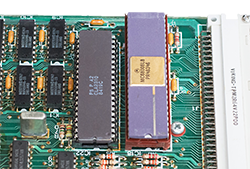
Cycle-accurate simulation of the interaction between the 68008 CPU and the ZX8301 ULA chip and the resulting CPU delays allows to run all software at the exact same speed as on a QL.
Video generation and interrupts are now better synchronized with the CPU and a delay is added when the CPU communicates with the 8049 "IPC" microcontroller, depending on its current load.
 
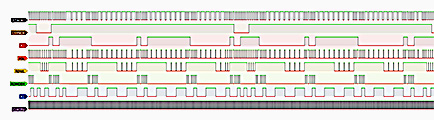
QL CPU logic trace
Accuracy was tested by comparing the Q-emuLator CPU interpreter to the timings measured from long logic signal traces collected on a real QL.
ICL One-Per-Desk emulation
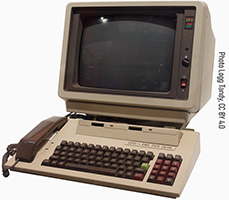
ICL One Per Desk computer
The One Per Desk (OPD) was a computer released by International Computer Limited (ICL) in 1984. Targeted at businesses, it combined computing and telecommunications, including a telephone handset, two telephone lines, a data modem, an answering system and built-in applications.
The hardware was developed in collaboration with Sinclair and based on the QL (CPU, two ULA chips and microdrives), but the motherboard was redesigned and it also included an 8051 microcontroller, a third custom ULA, a 1200 baud modem, a speech synthesizer and a battery to persist settings and telephone contacts. It had its own operating system and microdrive format that can be emulated using the new MDVRAW file format.
 
Q-emuLator partially emulates the OPD, including keyboard emulation, ROM slots, microdrives and battery-backed memory.
Telephony, modem, sound and speech synthesizer and expansions like floppy disks are not currently emulated.
Note: OPD ROMs are not included.

QSound Interface
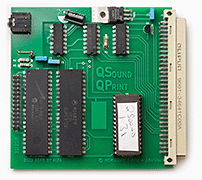
QSound Interface
The QSound interface was an add-on for the QL that offered 3 channels of sound output, provided by an AY-3-8910 sound chip and available through an audio jack.
(The picture on the left is a modern-day replica.)
AY-3-8910 audio chips and variants have been used in many arcade machines, computers (Amstrad CPC, MSX, Spectrum 128K) and game consoles of the 80s.
While at the moment there are not many QL programs that can use this card, it is now supported by a number of software and hardware QL emulators, so I hope that we will see more software for it in the future.
MDVRAW file format
MDVRAW cartridge image
Existing microdrive image formats for the QL can only be used to represent cartridges created by the QL's QDOS operating sytem.
The new MDVRAW file format stores microdrive data at a lower level and can be used by other operating systems like the ICL OPD and GST 68K/OS.
In addition to the stream of data, MDVRAWs keep track of unmagnetized areas of the tape, used by the QL to detect the gaps between sectors.
Window mode for Q60 and Aurora graphics modes
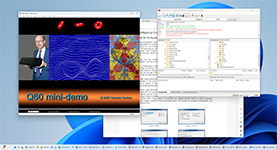
Q60 graphics mode running in a window
In Q-emuLator 3, extended graphics modes were only available full screen. Now they can be used in windowed mode as well as full screen.
Debugger improvements
ICL One Per Desk computer
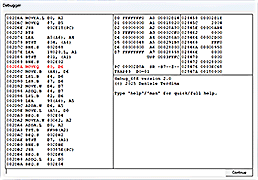
  • The built-in debugger now keeps a history of recent commands.
  • New commands, including memory breakpoints and QL specific commands (e.g. DF to display a floating point number).
  • Commands similar to the ones in the MAME emulator (AKA cheat debugger commands) allow to search memory for locations that change according to a specified rule.
  • User manual.
Monochrome displays
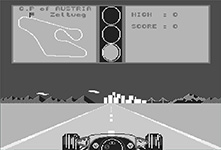
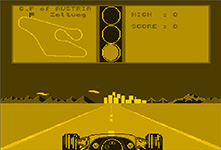
Option to simulate the colours of a monochrome monitor.
Grayscale monitor image Amber monitor image Green monitor image
Other improvements
  • The built-in RAM disk has been rewritten to support subdirectories and to use very little QL memory.
  • BEEP: reduced audio latency on Windows 10/11 and more accurate fuzzy and random sound parameters.
  • Additional joystick options.
  • Serial ports: support for low level access and inference of BAUD rates that don't fit in 16 bit.
  • Option to set default directories for QCF files, ROMs, file containers and QL file sytem directories.
  • Menu command to check for updates and install them.
  • Ability to specify a second expansion slot ROM and support for larger expansion ROMs.
  • Pause the emulated QL.
  • Auto speed option to run games at QL Speed but load them faster.
  • Option to simulate microdrive noise.
  • New web pages for troubleshooting and to download old emulator versions.
  • Create new empty MDV, MDVRAW, QXL.WIN and IMG file containers.

 
File image creation menu